
Forge AI
AI that works inside the process.
While you design, Forge AI works under Forge Studio and the Designer assistant: it knows the platform’s rules, asks when something is missing and never holds your users’ credentials. While the process runs, AI agents are its steps: they work on your own agentic platform, and Forge orchestrates them and keeps them in the audit trail.
People and AI agents in one governed process.
Forge does not build yet another closed AI ecosystem. An AI agent is one more step of the process, like an approval or an integration: the process decides when to call it, what to hand it and what to do with the result. The agent itself runs on the platform you already have or choose.
- The process in ForgeOrchestration, rules, approvals and the audit trail
- An AI agent as a process stepA simple task returns its result at once; a complex one may run for hours or days, and the process waits for it
- Your agentic platformThe agent works in an environment you already have and control
- Microsoft Foundry & Copilot
- AWS Bedrock
- Google Vertex AI
- Oracle OCI Gen AI
- SAP Joule
- Salesforce Agentforce
- ServiceNow AI Agents
| What | Who |
|---|---|
| Orchestrating the process and calling agents from it | Forge |
| Carrying out the agent’s task | Your agentic platform |
| Tool calls (MCP) | Your agentic platform |
| Agent identity | Your identity service, e.g. Microsoft Entra Agent ID |
What an agent does in a process
- Assesses the risk of a purchase order.
- Extracts the data from an invoice or a contract.
- Classifies an e-mail or a complaint.
- Drafts a reply to a client, which a person approves.
Where Forge AI is heading
What we are building next.
- AI task templates
- MCP support
- Agent chaining (A2A)
- AI security
- Agent identity
- Reusable AI processes
Four things to know about Forge AI before you clear it.
- Your credentials never reach the AI
- A broker authenticates; the AI reads back through a narrow, audited gateway.
- Your choice of model provider
- OpenAI GPT‑5.x or Anthropic Claude. Switch without re-platforming.
- Runs next to your platform
- Its database, memory, queues and credentials are its own.
- Governed and observable
- A role-based operator console, with usage attributed per user and per feature.
It asks instead of inventing.
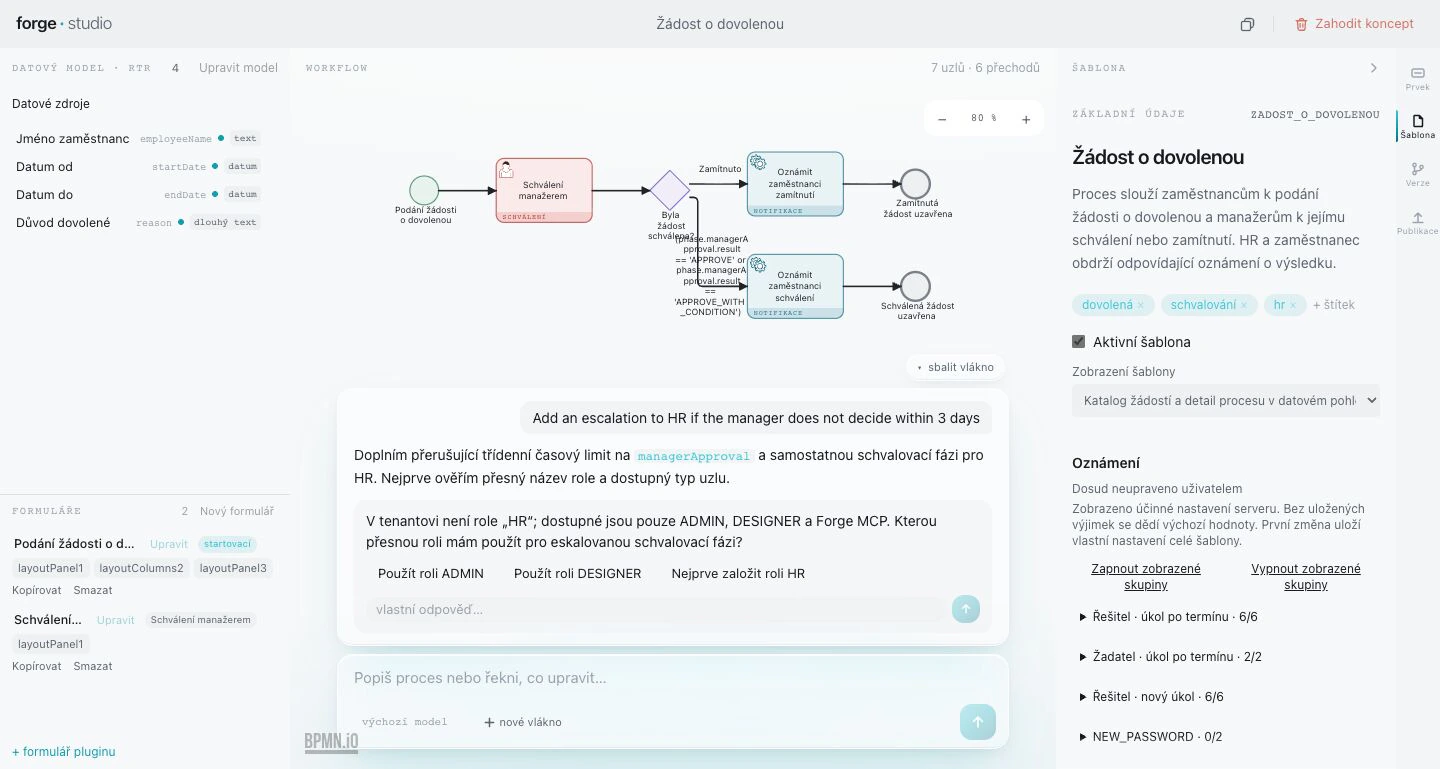
Asked for an escalation to HR, Studio checks the workspace first. There is no HR role, so it stops and asks: it offers the roles that exist, the option to create HR first, and room for an answer of your own.
“Add an escalation to HR if the manager does not decide within 3 days.”
There is no role ‘HR’ in this workspace — only ADMIN and DESIGNER. Which role should I use?
How a request to the AI travels.
Studio and the Designer assistant never talk to the AI directly. A broker in your platform authenticates the user first; Forge AI then works back into the platform only through a narrow, audited gateway. Your users’ platform credentials never cross over.
- Studio or the assistant sends the requestFrom Forge Studio, or with ⌘J in the Designer.
- The broker authenticates the userIt sits inside your platform and is its security boundary.
- Forge AI does the workNext to your platform, with the model provider you chose.
- A narrow gateway backForge AI reads and builds in the platform only through a narrow, audited gateway.
Your users’ platform credentials never cross into Forge AI.
Grounded in the platform’s own rules.
Forge AI works from a catalogue of the platform’s elements, derived from the Designer’s own validators. Each element carries a posture that says how far the AI may go.
Places it alone
Elements the AI may place and configure by itself.
Leaves named fields for a human
The AI may place the element, but named fields are completed by a person, and identifiers are never invented.
Never touches it
Human-only elements. The AI does not create them at all.
Plans first, asks, corrects itself
It lays out a plan before it builds, asks when a fact is missing, and when the platform’s validation rejects a step, it reads the error and corrects the step.
Choose your model.
Forge AI works with OpenAI GPT‑5.x or Anthropic Claude. Routing is set per deployment, so each installation uses the provider you picked, and you can switch without re-platforming.
- OpenAI GPT‑5.x
- Anthropic Claude
It learns from outcomes, anonymously.
Ratings and the reasons behind rejected proposals become short lessons for the next build. Personal data is stripped before a lesson is kept.
Governed and observable.
Forge AI is run from an operator console with four roles. Accounts are created by an administrator; there is no public sign-up. Usage is attributed per user and per feature.
- Owner
- Everything an admin can do, plus transferring ownership.
- Admin
- Changes models, tools, memory and settings; manages members and roles.
- Operator
- Starts and resumes runs, and answers approvals.
- Viewer
- Reads everything, changes nothing.
What your architects and security team will ask.
- Its own database, memory, queues and credentials
- Sessions, usage, memory and job queues live in Forge AI’s own database and storage. Its model credentials are its own too.
- Inference at the provider you choose
- Model calls go to the provider configured for your deployment.
- Streamed, typed frames
- Studio receives the AI’s work as a stream of typed frames, such as
plan,clarify,self_correctanddone, so every step is visible and can be checked. - Error reporting and token budgets
- Errors are reported to monitoring, and a token budget refuses further model calls once its limit is reached.
- Fails closed
- The operator console passes on only a known list of operations. An unknown change is refused before it reaches the AI.
- A catalogue pinned to the platform
- The element catalogue is derived from the Designer’s validators and pinned to them by content hash; a drift check fails when the two differ.

Tell us the process that's costing you.
Bring one real process to the demo. We describe it to Studio together and you watch it take shape on a working platform — not on slides.